Language#
言語設定#
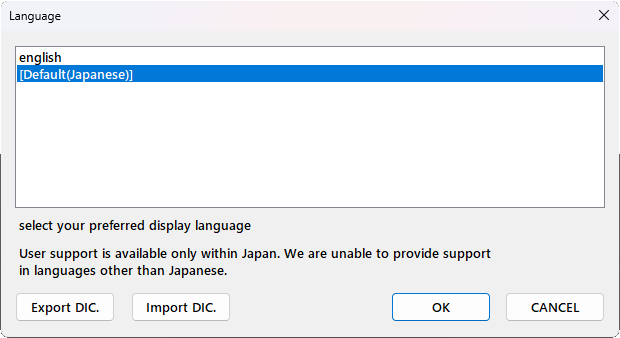
表示言語を選択します。現在、利用可能な言語辞書リストから表示する言語を選択してください。
辞書に組み込まれていない単語は、翻訳されません。
辞書ファイル#
辞書ファイルは、エクスポートまたはインポートできます。
エクスポート先にすでにある辞書ファイルを選択した場合は、差分を追加します。
インポートも同様に組み込み済み辞書と同じ言語に差分を追加します。
辞書ファイルは、xml形式です。
オリジナル辞書の作成#
オリジナル辞書を作成する場合は、エクスポートで元になる辞書を出力してください。 辞書ファイルのファイル名が言語名になります。
xmlのタグは、srcとlocalizeでセットになっています。localizeに翻訳したテキストを設定してください。
新しいシステム、部品を追加したときなど、未翻訳箇所がある場合は、作成したオリジナル辞書に対して、エクスポートしてください。 新しい項目を追加します。
辞書自動更新#
システムにある辞書で、バージョンアップなどによって辞書の更新が必要な場合は、更新差分を自動的に適用します。
翻訳の修正は自動更新の対象外です。
サポート対象外です#
言語表示機能は、試験的に実装しているため、サポート対象外です。
フォントが対応していない文字は表示できません。
Setting Language#
Select the display language. Please choose a language from the list of currently available dictionaries.
Words not included in the dictionary will not be translated.
Dictionary Files#
Dictionary files can be exported or imported.
If you select an existing dictionary file as the export destination, any differences will be appended to it. Similarly, importing will add new entries to the built-in dictionary for the corresponding language.
Dictionary files are in XML format.
Creating a Custom Dictionary#
To create a custom dictionary, first export an existing dictionary to use as a template. The filename of the dictionary file will be used as the language name.
XML tags come in pairs: src and localize. Enter the translated text in the localize tag.
If there are untranslated sections (e.g., after adding new systems or components), export them to your custom dictionary. This will add the new items to the file.
Automatic Dictionary Updates#
If a dictionary in the system requires an update due to a version upgrade or other changes, updates will be applied automatically.
Please note that manual corrections to translations are not covered by automatic updates.
Disclaimer (Unsupported Feature)#
The language display feature is currently experimental and is not officially supported.
Characters not supported by the system fonts cannot be displayed.